

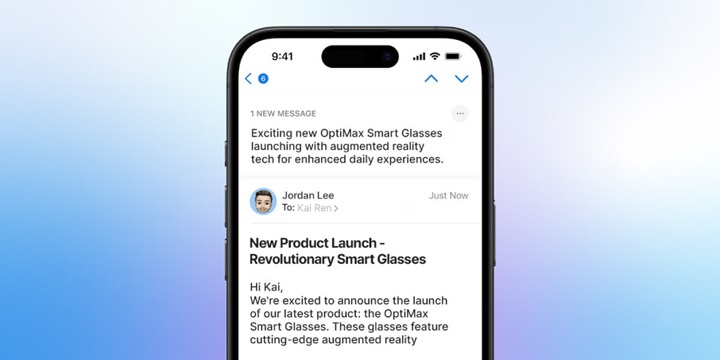
Google and Yahoo call it “automatic extraction.” Sounds clinical, but if you’ve seen those featured snippets on Google, where you get a quick answer without clicking any link, you’ve already met the concept.
Now, they’re bringing that same philosophy into your inbox. AI email summaries is what they call it.
Instead of relying on your preview text, Gmail and Yahoo use artificial intelligence to scan your email and extract what they think matters. Like it or not, that’s what your subscribers see first.
Why does that concern email marketers?
It marks the time to rethink subject lines. You can’t count on the preview text to finish your sentence or set the tone. Your subject line needs to stand on its feet, and your email content needs to back it up with clarity upfront.
Unless Gmail and Yahoo change course (and let’s be honest, they probably won’t), brands need to get intentional.
Meaning that, making sure AI-generated summaries don’t misrepresent your message. Or worse, confuse your subscribers.
So let’s break down how to adapt to this shift in email marketing without spiraling into a panic.
What Are AI Email Summaries, Exactly?
Per this infographic on Email Trend & Insights, 2025 by Email Mavlers, inbox providers are expected to grip more control around the inbox experience, leaving email senders a lot to navigate in the coming years. AI-generated email summary is the testament to this.
As if email were the only one left that isn’t jumping on the AI train, email providers are now “experimenting” with AI-generated summaries of your emails.
As these platforms auto-generate bite-sized summaries, giving users a sneak peek into your email content, preview text becomes irrelevant, says Hank Hoffmeier, Sr. Manager of Marketing Operations, Kickbox.
He is accurate.
In May 2024, Google demoed how Gemini could summarize your inbox. Not to be outdone, Apple launched ‘Apple Intelligence’ in June, teasing how this would reshape its inbox experience with iOS 18. No wonder, email marketers everywhere had a mass meltdown.
And then, Yahoo rolled out a revamped Yahoo Mail desktop experience with AI-powered one-line summaries.
Said another way, the preview text we’ve all clung to is getting rewritten or replaced.
So, what exactly are these AI summaries doing?
Instead of just pulling the top line of your email, these platforms scan your content for what they think is relevant. That could be:
- A discount you buried halfway down.
- An image with a big “30% OFF” splash.
- An expiration date.
- Other promotional details.
Then, that content is shown as a clickable preview or used to override your original preview text.
AI email summary is designed to help users “scan smarter”. Sounds great for the inbox experience, but throws a wrench in your email design strategy if you’re not prepared.
Why Does This Matter To Marketers?
It would be delusional to think that AI summaries are limited to Gmail and Yahoo’s experiments.
Experts expect that by 2025, even more inbox providers will roll out their own versions. They will be adding layers of automation meant to “help” users by summarizing email content.
And here’s the problem: those summaries can be wildly hit-or-miss.
Chris Behrens, Founder of BearMail, puts it bluntly:
“From an accuracy and relevancy perspective, email summaries are a completely mixed bag, with Google and Yahoo often summarizing random parts of your email as ‘key’ content for your subscribers.”
So remember how you place your sneak peek offer or limited-time discount halfway down the email to reward the engaged reader? That could now be spoiled before your subscriber even opens the message. Surprise ruined.
But all is not doom and spam filters. If you adapt early, you can guide the AI summary instead of being at its mercy.
Fortunately, both Gmail and Yahoo are offering tools to help marketers better influence what gets shown in the AI summaries.
Google, for instance, has documentation on “email annotations”. It lets you include structured data to control whether Gmail shows deal tags, product carousels, or a single-image preview instead of random snippets. Not 100% foolproof, but it’s better than nothing.
Apart from annotations, structure matters. Carin Slater, email developer at Litmus, points out a key shift in approach:
“If you’re writing good emails where your subject line and your email body copy align, this shouldn’t affect any of your metrics. However, if you were trying to use a surprise reveal strategy or (heaven forbid) pull a bait-and-switch strategy, this might mess with that.”
She also recommends not losing hope on the preview text just yet. Some email clients still show it,
“And if you have a surprise reveal strategy, try using something like scratch-offs instead,” she adds.
One more thing marketers often forget: accessibility.
To help inbox AI do its job well, your content should be structured in a way that both humans and machines can understand. That means:
- Use real, readable text (not just images)
- Add alt-text to every image.
- Don’t bury your key info at the bottom.
- Keep content hierarchy clean and semantic.
AI summaries are not skimming the top lines but the entire copy. Meaning that, every part of your email gets into what gets surfaced.
As Carin puts it:
“It’s crucial to provide sufficient information in your email to enable the AI email summary to reflect your message accurately. This will help ensure your subscribers don’t miss the overall goal of your email.”
How Email Marketers Should Adapt (Optimization Tips)
Image-only emails are not good for AI summaries
If your email is just one giant image, AI has nothing to read because it’s not scanning your alt text (yet). If possible, start phasing in live, HTML text. Even a short intro line or headline is better than nothing.
Key information should be unmissable by AI
Punch in headers, bold text, short paragraphs, and bullets to make details easily noticeable. With a clearer structure, AI has a better chance of pulling out the right takeaway.
Subject lines should have an independent existence
Subject lines that look for the preview text to make sense won’t do any good for your summaries. Put your hook or the core idea within the first 20 characters. That’s often all the AI (or your reader) will catch.
Don’t stop writing preview text seriously
Even if AI replaces it sometimes, many email clients still show your preheader. Use visible or invisible preheaders wisely to support your subject line.
Avoid Vague or “Clever” Open-Bait
These rely too heavily on the preview to clarify. Without context, they just fall flat in AI summaries and risk losing opens.
Don’t bury the value
Have a discount, launch update, or time-sensitive offer? Say it early. That’s what AI will catch, and it’s what your audience wants to see.
Take your “From Name” into this
If your sender name is short, use those extra characters to your advantage. A descriptive “from name” can help offer the gist of your email. Especially when your preview text gets wiped.
Use Clean, Accessible Code
Structure your email with semantic HTML, not just nested tables or styled divs. It helps both AI and screen readers interpret your content better. This improves accessibility and boosts deliverability.
Monitor the sudden drops in open rates
If your open rates start declining, AI summaries could be part of the problem. Run A/B tests with different subjects and content formats to see what’s getting highlighted or snubbed by AI.
Clear, not clever
The clearer your message, the better chance AI has at summarizing it correctly. One main goal per email and tighter copy should be the best practices to stick to every time you design an email.
Wrapping Up
It’s not surprising that AI-generated email summaries are reshaping the way we write and design emails. It is indirectly pushing marketers to be mindful about clarity, relevance, and content that gets to the point fast.
The best move forward? Don’t fight it—adapt to it.